
Production
Management Tool

The Challenge
To develop a solution for digitised and automated management of daily factory production which can be accessed by all staff members at any time. Less educated factory workers should easily access the app.
Consideration
A powder coating industry was studied for industry research and first hand information. Factory workers, managers and CEOs were interviewed to understand the pain points in the current system.
Research and Analysis
Understanding the user -
Users at different levels in the factory were interviewed to understand their needs and pain points.
From these interviews 4 user personas were defined - CEO, Admin, Worker Lead and Workers


User Insights
"I have to call the administrator all the time to get production updates."
"I cannot be available on factory floor all the time to check production status."
"I don't have data in hand while talking to the client if I am not in factory."
CEO
"I get the inward receipts very late and updating the stocks becomes difficult and delayed."
"Explaining the Stocks and work data on telephonic call to boss is very difficult."
"I have no time to update paper receipts to computer and update material stocks continuously."
Admin
"The administrator is not always available or we have to wait for very long time to hand over receipts and report work updates."
Worker
Factory flow diagram
The production process and day to day activities in the factory were analysed.

1.
Inward receipt of Jobs/ materials is created. Jobs/ material is added to the stock and shifted to the storage section

3.
Daily work order from client to CEO to staff via calls or emails.

Task details and schedules handed over by Admin to the Worker Lead on paper or verbally.
5.

Raw materials consumed in powder coating of jobs
7.

Receipt is entered by Admin to the system.
2.

4.
Admin then creates a task ascedule and divides the team accordingly.

Work assigned by Worker Lead to all workers
6.

Completed Jobs are packaged , checked and shipped to the next vendor
8.

Shipment notified to the Client
9.

.jpeg)

Design Prototype

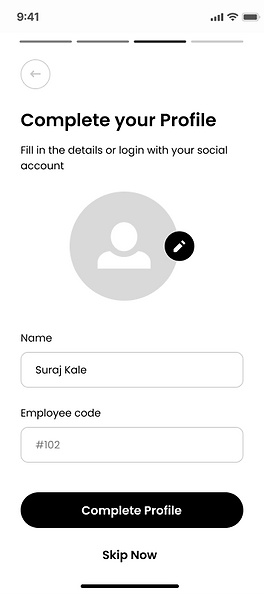
Onboarding screens




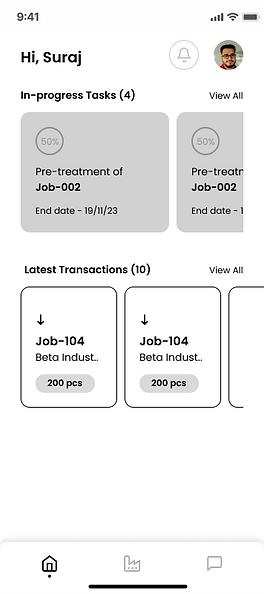
Home and Factory
Role wise customisation of actions on home and factory screen
Daily update of tasks on the homescreen

Actions customised as per role
Admin role has access to all actions and her homescreen and updates are customised accordingly
New orders will be visible to only Admin and CEO


Inward/ Outward
Inward of Jobs for powder coating and raw materials occurs on a daily basis which is recorded by Worker lead


In case of Materials, Price per unit and Amount fields are added.
They can either be pre-populated or entered manually
Each transaction has a unique Challan No. which is shared with the vendor to track inward easily.


Outward screens similar to inward screen.
User will make less mistakes if screen flow is uniform.
Events


QC


